How to refresh Power BI Dataset, once pipeline in ADF is completed We can do this new very simple steps – Just follow as below using power Automate. Step 1: - Open Power Automate & Click on Automated cloud Flow. Step 2: Give name to your flow and hit skip. Step 3: Search for “ When a HTTP request is received” Trigger and Save it, New link will get generated, which we will use in ADF pipeline activity. Step 4: Step 5: Add new Step and choose Refresh a dataset. Select your workspace & Dataset and save it. Now Jump to you ADF where your have the pipeline activities. Step 6: Drop Web activity in pipeline window and connect with previous activity on success. Step 7: Click on execute pipeline and fill the Name in General tab Fill up the information in setting as shown below – Paste URL from Power Automate g...
Posts
Power BI refresh via API using Power Automate
- Get link
- X
- Other Apps
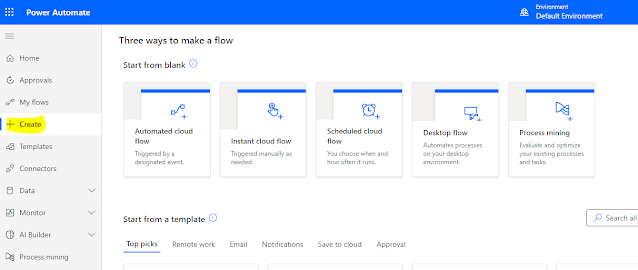
Refresh Your Power BI Report every second using Power Automate And it's free !!! It's a 5-minute Tip & Trick for Power BI Users. power bi refresh schedule - Power Automate via API Without going into more detail let's start - Step 1 Sign in to Power Automate and Click on Create. All Template will get open Step 2: Select Automated Cloud and enter Flow Name and hit Skip. Step 3: Search for Recurrence Trigger - Step 4: Set up frequency as per your requirement - Monthly, weekly, daily, Hourly , seconds Etc. Step 5 : Add a new step as refresh Dataset. Select your workspace and dataset your want to refresh and save your flow. It will Refresh your Power BI report via API without any schedule refresh. Learn AI Trends and How They Are Transforming the Lives of Gen Z https://thetrendsettershub.blogspot.com/2023/08/title-ai-trends-and-how-they-are.html